Cornerstone renderer is a multi-threaded rendering engine offering most of the functionality described in OpenGL 3.2 Core Profile specification.
Knowledge of OpenGL is not required to use the renderer, but it is beneficial. Most of the desired visuals can be achieved just by combining the existing widgets with animations.
This document describes how to do custom rendering in Cornerstone. For the most common use-cases (e.g. showing text/pictures/videos) the standard widgets are enough and no custom rendering is required.
Rendering in Cornerstone is always tied to widgets. They are the only thing that is drawn. Drawing commands are fed to the rendering engine via Luminous::RenderContext-object. Nothing can be drawn to Cornerstone application without an instance of RenderContext. Instance of RenderContext is passed to the Widget::render-function which propagates it to the functions executing actual drawing commands. Widget::render-function looks essentially like following:
As can be seen from the snippet above, widgets are by default rendered in back-to-front-order. Widget::render-function can't be overriden because it is for example responsible for clipping. For the custom rendering it is often enough to override renderContent- or/and renderBackground-functions. The other functions called in Widget::render-function can be overriden for more exotic effects.
An important restriction to keep in mind is that none of the rendering functions are allowed to modify the state of the widget being rendered. This restriction is placed, because rendering functions can be called from multiple threads at the same time. Objects can also be clipped so it is not guaranteed that all of the rendering functions are called for each frame.
Cornerstone offers two interfaces for implementing custom rendering in widgets: a high-level API through draw-functions and a low-level API using custom geometry and shader programs.
RenderContext offers the following high-level drawing functions:
All of the functions have compulsory style-object as their parameter. For all of the functions except drawText the type of the style-object is Luminous::Style. For text drawing it is Luminous::TextStyle. Style objects are used to pass parameters for the drawing functions. By default one can set fill color or texture and stroke color and width.
If desirable default fill and stroke shader programs can be replaced as well. In that case style enables passing of uniforms and additional textures.
Using low level API one can define custom geometrical shapes. There are three functions in RenderContext which provide access to the low level rendering. Each function has a different degree of assistance from the Cornerstone rendering engine. The functions are following:
All of the rendering resources handled by Cornerstone renderer have the same structure. Each resource consists of two classes, one in CPU memory and another in GPU memory. This separation is needed for resource management to work with multiple rendering contexts. Users of Cornerstone renderer should only interact with CPU side classes. Classes in GPU memory are managed by the implementation. This is one of the reasons that make applications to work from a single screen to large walls with multiple rendering threads without modifications.
The rendering library Luminous is based on OpenGL 3.2 Core Profile so all rendering is done with shaders. CPU-side classes for managing shaders are Luminous::Shader for individual shader objects (OpenGL shader object) and Luminous::Program for shader programs (OpenGL shader program).
In Cornerstone, each shader program is tied to corresponding C++ classes for vertices and uniform blocks. Uniforms outside the uniform block can be used freely with Luminous::ShaderUniform. The mapping between incoming vertex attributes and the fields of the corresponding C++ class is done using Luminous::VertexDescription and the order of the fields in the C++ class. See Advanced rendering example for example usage. Mapping of uniform block fields is also done with respect to the order of fields in C++ class. Uniforms outside uniform block are handled using their names. Also mapping between textures and sampler units is based on given names.
A few built-in shader programs exist which implement basic needs for rendering. These are following:
These can be useful, if you just want to pass some custom vertex data for rendering without wanting to write your own shaders.
Luminous::RenderContext keeps track of transformations related to rendering. As usual in computer graphics, transformations are stored as 4x4 matrices (Nimble::Matrix4T). This enables feeding them directly to OpenGL. Cornerstone renderer splits the rendering transformations into two matrix:
The following diagram illustrates how the matrices in Cornerstone renderer map to traditional computer graphics transformations.

The origin of the coordinate system in Cornerstone is top-left corner, with x increasing to the right and y increasing down. The base unit is a pixel. Widgets are internally always considered to be rectangular. The rectangle defined by points [0, 0] and [widget.width(), widget.height()] corresponds to the content box of CSS box model. Border and padding of the widget are located outside this box. World coordinates in Cornerstone correspond to the pixels of the possibly multi-head screen setup. The total area of the world is defined as bounding box of windows defined in the screen.xml. It is the size of Application::mainLayer. The picture below shows an example of model and world coordinates. Generally user shouldn't ever make the assumptions about the screen size when when writing Cornerstone applications.
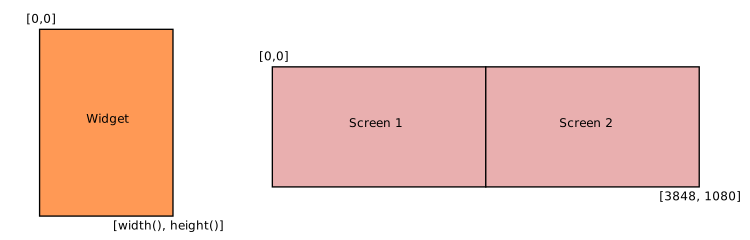
When overriding the rendering of the widget the model matrix can be accessed by calling RenderContext::transform. RenderContext stores internally a matrix stack which keeps track of the transformations of each widget. If using the high-level API user can ignore all of the transformations and work in the model coordinates of the widget. The needed transformations are applied to geometry automatically. Manual handling of transformations is needed only if using custom vertex shaders.
Below is a brief checklist of things to ask yourself before implementing your own widget with custom rendering:
Cornerstone contains a post-processing framework that can be used to apply image-based post-processing effects to applications. The post-processing phase is run after the normal rendering and consists of a number of chained post-process filters that are applied sequentially. In principle, the post-process framework functions by rendering the whole scene into an auxiliary off-screen render target. The render target is then used as a source texture for the first filter in the filter chain. The filter uses a custom shader to render a new image that is then used as a source for the next filter in the chain. The last filter renders the image directly to the back buffer.
Creating custom filters is discussed in the PostProcessing example.
Filters can be added to the application at any time from the main thread. Adding them from any other thread can be dangerous since the renderer needs to know about active filters before rendering to setup needed resources. Filters cannot be removed once they have been initialized but they can be disabled and then skipped by the renderer. Each instance of a filter can only be added once but to use the same filter twice you can add two separate instances of the same filter.
Filters have an order member that specifies the order in which the filter is applied. The default value is zero and all filters with the same order number are applied in the order in which they have been added to the system. It is good to keep in mind that in some cases the ordering might have significance. The following diagram shows how the filter chain works in principle.
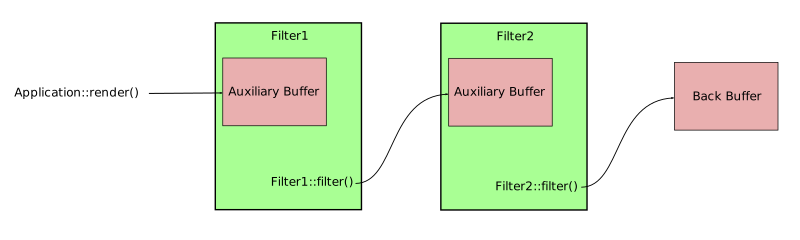
For each post-process filter a corresponding filter context is created within each rendering thread. This serves as a data storage for the frame buffers that are needed by the filters. By default each context contains a window-sized render target that has a color and depth buffers attached but this can be changed if needed.
When using the post-processing framework the application actually renders the whole scene into a separate off-screen render target that has the same format as the back buffer. The buffers in this render target are then copied to the first filter in the filter chain. The significance in this is that the copying can actually be indirectly affected and can be taken advantage of in advanced cases. For example when multisampling is enabled in the screen configuration and the filter context specifies a non-multisampled buffer (the default), multisample resolution happens automatically. By manually specifying a multisampled buffer for the filter all samples can be retreived. In principle, the same rules apply for the initial copy as for glBlit command in OpenGL.

