All Classes Namespaces Functions Variables Typedefs Enumerations Enumerator Friends Pages
AdvancedRenderingExample.cpp

This example shows how to create and use custom OpenGL shader programs in Cornerstone. We will create a widget whose texture is computed procedurally in the fragment shader.
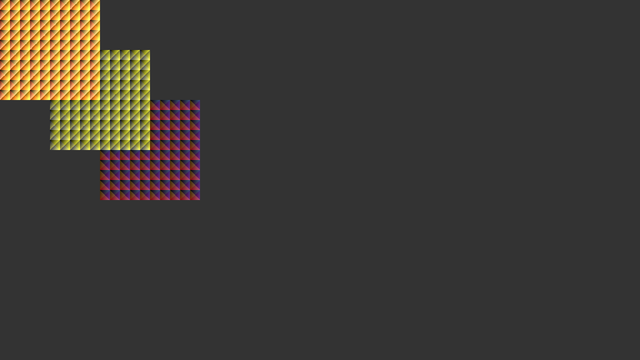
AdvancedRendering-screenshot.png
Screenshot of the Advanced Rendering example

To be able to render anything we have to create widget, because widgets are the only thing Cornerstone draws at all. Since we want to use our own shaders, we override renderContent-function.

class AdvancedRendering : public MultiWidgets::Widget
{
public:
AdvancedRendering();
virtual ~AdvancedRendering();
protected:
virtual void renderContent(Luminous::RenderContext &r) const OVERRIDE;

We will use five additional values in our shaders. These values are stored as attributes of the class for handy access using CSS-files. Also GLSL program and status flag are stored as members.

We feed our uniform values to shader program by defining our own uniform buffer format. Since we will be using drawPrimitiveT-function, it is necessary to have fields projMatrix, modelMatrix, color and depth with the appropriate types in our uniform block. The rest of the fields are used in our shaders for custom effects.

struct Uniforms
{
Nimble::Matrix4 projMatrix;
Nimble::Matrix4 modelMatrix;
Nimble::Vector4 colors[4];
float depth;
float modulator;
};

One must pay special attention to the memory layout of the data elements: Matrix4 and Vector4 data types must come first in the struct, as they need to be aligned to 16-byte boundaries. After the 16-byte elements, we can introduce the smaller data elements, such as the 4-byte floating point values. The other important thing to keep in mind when using uniform blocks, is that the order of the defined struct must match exactly to the block defined in shaders. The definition of uniform block used in shaders is shown below:

layout(std140, column_major) uniform BaseBlock
{
mat4 projMatrix;
mat4 modelMatrix;
vec4 color;
vec4 colors[4];
float depth;
float modulator;
};

Note that the layout qualifiers are not optional when using Cornerstone renderer! The name of the uniform block can be chosen freely as long as it's consistent across all the shaders attached to the program.

In the constructor we initialize our widget's attributes and load and attach shaders to the GLSL program.

AdvancedRendering::AdvancedRendering()
: m_color1(this, "advanced-color-1", Radiant::Color(1, 0, 0, 1)),
m_color2(this, "advanced-color-2", Radiant::Color(1, 1, 0, 1)),
m_color3(this, "advanced-color-3", Radiant::Color(1, 0, 1, 1)),
m_color4(this, "advanced-color-4", Radiant::Color(0, 1, 0, 1)),
m_modulator(this, "advanced-modulator", 0.5f)
{
if(!m_program.loadVertexShader("advanced-rendering-example.vs")) {
Radiant::error("AdvancedRendering::AdvancedRendering # Could not locate the vertex shader");
m_ok = false;
}
else if(!m_program.loadFragmentShader("advanced-rendering-example.fs")) {
Radiant::error("AdvancedRendering::AdvancedRendering # Could not locate the fragment shader");
m_ok = false;
}

In the latter part of the constructor we set vertex description for the shader program. This description defines what attributes vertices have and which order the attributes have in the corresponding struct.

else {
desc.addAttribute<Nimble::Vector2>("vertex_position");
desc.addAttribute<Nimble::Vector2>("vertex_uv");
m_program.setVertexDescription(desc);
m_ok = true;
}
}

The order of the vertex description's added attributes must match to the struct defining vertex attributes. Otherwise attributes will get mixed. The definition of the vertex struct is following:

struct Vertex
{
Nimble::Vector2f location;
Nimble::Vector2f texCoord;
};

Actually in this case we wouldn't need to define the struct of vertex attributes because the one we defined is equivalent to Luminous::BasicVertexUV. The values are mapped to the shader by the strings used in Luminous::VertexDescription. These strings must match with the incoming attribute names used in shaders. Below is shown definition of inputs to a vertex shader:

in vec2 vertex_uv;
in vec2 vertex_position;

The vertex shader transforms given vertices first to the eye space and then to the clip space. Eye space corresponds to the pixels of the screen where origo is located at the top left corner. Finally texture coordinates are copied to the fragment shader.

smooth out vec2 fs_vertex_uv;
void main()
{
vec4 eyeCoordinates = modelMatrix * vec4(vertex_position, depth, 1);
gl_Position = projMatrix * eyeCoordinates;
gl_Position.z = depth * gl_Position.w;
fs_vertex_uv = vertex_uv;
}

In the fragment shader we create the texture by first calculating weights for the colors using uniform variable modulator. After this we take a weighted sum of the colors passed as uniforms. The alpha value of the fragment is set to 1. By default Cornerstone renderer uses the first active output in fragment shader as an output variable. In this case the output binds to frag_color.

out vec4 frag_color;
void main()
{
float weights[4] = float[4](mod(fs_vertex_uv.x, modulator),
mod(fs_vertex_uv.y, modulator),
mod(fs_vertex_uv.x + fs_vertex_uv.y, modulator),
mod(fs_vertex_uv.x - fs_vertex_uv.y, modulator));
vec4 col = vec4(0,0,0,0);
for(int i = 0; i < 4; ++i)
col += weights[i]*colors[i];
frag_color = col;
frag_color.a = 1.0;
}

The actual rendering of the widget is done in renderContent-function. The rendering is started by creating a rendering command by calling Luminous::RenderContext::drawPrimitiveT. Function takes six parameters which are described by the following snippet.

auto b = r.drawPrimitiveT<Vertex, Uniforms>
0, // number of indices
4, // number of vertices
m_program, // shader program to use
backgroundColor(), //color for the uniform variable
1.0f, // width of the primitive (ignored with triangles)
style); // style object for plain uniforms etc

The return value of drawPrimitiveT has type Luminous::RenderContext::RenderBuilder. The actual data for rendering is piped to the renderer through this object. Since the object is a templated type, we can access the structs defined earlier through this object.

b.vertex[0].location.make(0, 0);
b.vertex[0].texCoord.make(0, 0);
b.vertex[1].location.make(width(), 0);
b.vertex[1].texCoord.make(5, 0);
b.vertex[2].location.make(0, height());
b.vertex[2].texCoord.make(0, 5);
b.vertex[3].location.make(width(), height());
b.vertex[3].texCoord.make(5, 5);
b.uniform->colors[0] = m_color1;
b.uniform->colors[1] = m_color2;
b.uniform->colors[2] = m_color3;
b.uniform->colors[3] = m_color4;
b.uniform->modulator = m_modulator;

That is all we need for custom rendering. After RenderBuilder is created and supplied with the corresponding data, the renderer has all the information it needs. We don't actually need to execute any separate call for rendering. The main program just creates three widgets and setups some animations for them to make example more interesting. The full C++-source code of the example is shown below:

/* Copyright (C) 2007-2013 Multi Touch Oy, Finland, http://www.multitaction.com
*
* This file is part of MultiTouch Cornerstone.
*
* All rights reserved. You may use this file only for purposes for which you
* have a specific, written permission from Multi Touch Oy.
*
*/
#include <MultiWidgets/Application.hpp>
#include <MultiWidgets/Animators.hpp>
#include <Nimble/Random.hpp>
namespace Examples
{
class AdvancedRendering : public MultiWidgets::Widget
{
public:
AdvancedRendering();
virtual ~AdvancedRendering();
protected:
virtual void renderContent(Luminous::RenderContext &r) const OVERRIDE;
private:
Luminous::Program m_program;
bool m_ok;
struct Uniforms
{
Nimble::Matrix4 projMatrix;
Nimble::Matrix4 modelMatrix;
Nimble::Vector4 colors[4];
float depth;
float modulator;
};
struct Vertex
{
Nimble::Vector2f location;
Nimble::Vector2f texCoord;
};
};
AdvancedRendering::AdvancedRendering()
: m_color1(this, "advanced-color-1", Radiant::Color(1, 0, 0, 1)),
m_color2(this, "advanced-color-2", Radiant::Color(1, 1, 0, 1)),
m_color3(this, "advanced-color-3", Radiant::Color(1, 0, 1, 1)),
m_color4(this, "advanced-color-4", Radiant::Color(0, 1, 0, 1)),
m_modulator(this, "advanced-modulator", 0.5f)
{
if(!m_program.loadVertexShader("advanced-rendering-example.vs")) {
Radiant::error("AdvancedRendering::AdvancedRendering # Could not locate the vertex shader");
m_ok = false;
}
else if(!m_program.loadFragmentShader("advanced-rendering-example.fs")) {
Radiant::error("AdvancedRendering::AdvancedRendering # Could not locate the fragment shader");
m_ok = false;
}
else {
desc.addAttribute<Nimble::Vector2>("vertex_position");
desc.addAttribute<Nimble::Vector2>("vertex_uv");
m_program.setVertexDescription(desc);
m_ok = true;
}
}
AdvancedRendering::~AdvancedRendering()
{
}
void AdvancedRendering::renderContent(Luminous::RenderContext &r) const
{
if(!m_ok)
return;
auto b = r.drawPrimitiveT<Vertex, Uniforms>
0, // number of indices
4, // number of vertices
m_program, // shader program to use
backgroundColor(), //color for the uniform variable
1.0f, // width of the primitive (ignored with triangles)
style); // style object for plain uniforms etc
b.vertex[0].location.make(0, 0);
b.vertex[0].texCoord.make(0, 0);
b.vertex[1].location.make(width(), 0);
b.vertex[1].texCoord.make(5, 0);
b.vertex[2].location.make(0, height());
b.vertex[2].texCoord.make(0, 5);
b.vertex[3].location.make(width(), height());
b.vertex[3].texCoord.make(5, 5);
b.uniform->colors[0] = m_color1;
b.uniform->colors[1] = m_color2;
b.uniform->colors[2] = m_color3;
b.uniform->colors[3] = m_color4;
b.uniform->modulator = m_modulator;
}
}
int main(int argc, char ** argv)
{
bool ok = app.init(argc, argv);
if(!ok)
return 1;
for(int i = 0; i < 3; i++) {
MultiWidgets::WidgetPtr w = MultiWidgets::create<Examples::AdvancedRendering>();
app.mainLayer()->addChild(w);
// Set widget parameters:
w->setSize(Nimble::SizeF(300, 300));
w->setLocation(Nimble::Vector2(i * 150, i * 150));
const char * paramNames [4] = {
"advanced-color-1",
"advanced-color-2",
"advanced-color-3",
"advanced-color-4"
};
for(int j = 0; j < 4; j++) {
auto anim = std::make_shared<MultiWidgets::AnimatorVector4f>(paramNames[j]);
float keytime = 1.0 + j * 0.2f;
anim->addKey(keytime, Nimble::Vector4(Nimble::RandomUniform::instance().randBool(),
anim->addKey(keytime, anim->key(0).value);
w->addOperator(anim);
}
}
return app.run();
}