The Widget3D example shows how to render 3D geometry inside applications using MultiTouch Cornerstone SDK.In this example we demonstrate how to render two different 3D objects: an interactive textured cube and an animated rotating propeller. It is recommended to be familiar with the AdvancedRendering example before proceeding to this example.
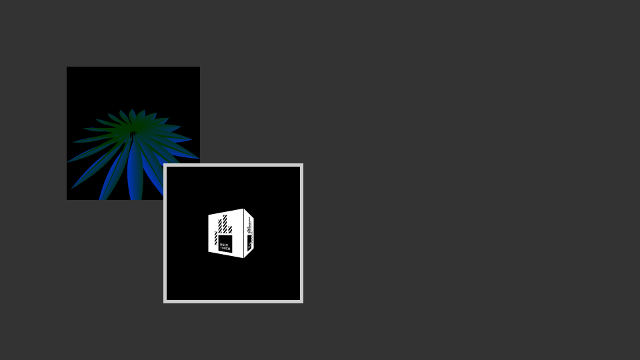
Screenshot of the Widget3D example
The example contains two custom widgets: CubeWidget and PropellerWidget that represent the cube and propeller, respectively, and they both derive from class MultiWidgets::FrameBufferWidget. For those interested, MultiWidgets::FrameBufferWidget is a widget that automatically sets up necessary resources for drawing custom geometry through an off-screen render target. This means that the geometry is rendered to a separate texture and that texture is then used when drawing the widget itself.
Below are the headers for the custom widgets:
CubeWidget.hpp:
#ifndef CUBE_WIDGET_HPP
#define CUBE_WIDGET_HPP
#include <MultiWidgets/FrameBufferWidget.hpp>
#include <Luminous/Buffer.hpp>
#include <Luminous/Image.hpp>
#include <Luminous/Program.hpp>
#include <Luminous/VertexArray.hpp>
namespace Examples
{
{
public:
CubeWidget();
enum CubeFace {
FACE_POSX,
FACE_NEGX,
FACE_POSY,
FACE_NEGY,
FACE_POSZ,
FACE_NEGZ
};
void setFaceTexture(CubeFace face, const QString & file);
private:
private:
float m_yRotate;
};
}
#endif
PropellerWidget.hpp:
#ifndef PROPELLER_WIDGET_HPP
#define PROPELLER_WIDGET_HPP
#include <MultiWidgets/FrameBufferWidget.hpp>
#include <Luminous/Buffer.hpp>
#include <Luminous/Program.hpp>
#include <Luminous/VertexArray.hpp>
namespace Examples
{
{
public:
PropellerWidget();
private:
void initVertexData();
private:
struct Vertex
{
};
std::vector<Vertex> m_vertexData;
float m_rotation;
};
}
#endif
In general for rendering 3D objects we need to do the following things: Load and describe shaders, Create or load and describe the geometry, eg. vertex data, setup transformations and render.
First, let's take a look at CubeWidget. For a cube we need a total of six faces each consisting of four vertices. Each vertex has a position and a texture coordinate. Because a cube is geometrically such a simple object we can just manually define each vertex. First, we define a struct that describes the data of one vertex and then define all vertices of the cube:
struct Vertex
{
};
static const Vertex vertexData[] = {
};
For rendering the cube we also need two matrices, i.e. the projection and the model-view transformation matrices. These are passed to the shader as uniforms and for that we need to describe the uniform buffer:
In the constructor we need to load the shaders that are used to render the geometry and create a description for the vertex attributes.
const QString vs("cube.vs");
const QString fs("cube.fs");
m_shader.setVertexDescription(desc);
The shaders themselves are very simple. The vertex shader simply transforms the vertices from object space to screen space and the fragment shader just assigns a color to the fragment based on the texture. The shaders are included below for reference:
The vertex shader:
#version 150
layout(std140, column_major) uniform BaseBlock
{
mat4 projMatrix;
mat4 modelMatrix;
};
in vec3 vertex_position;
in vec2 vertex_uv;
out vec2 fs_vertex_uv;
void main()
{
fs_vertex_uv = vertex_uv;
gl_Position = projMatrix * modelMatrix * vec4(vertex_position, 1);
}
The fragment shader:
#version 150
layout(std140, column_major) uniform BaseBlock
{
mat4 projMatrix;
mat4 modelMatrix;
};
uniform sampler2D tex;
in vec2 fs_vertex_uv;
out vec4 frag_color;
void main()
{
frag_color = texture(tex, fs_vertex_uv);
}
We then assign the vertex data to a vertex buffer and bind the buffer to a vertex array. By using a vertex array we can render the whole geometry instead of manually having to specify each vertex in every render call.
m_vertexArray.addBinding(m_vbuffer, desc);
To assign the texture for each face we define a function that reads a texture from the disk and stores the data in an array of textures:
void CubeWidget::setFaceTexture(CubeFace face, const QString & file)
{
m_textures[face].read(file);
}
In the render3D function we first setup the projection and model-view matrices. The projection matrix is a simple perspective projection. The model-view matrix first rotates the cube around the y-axis by m_yRotate degrees and then translates along the -z-axis. Then we tell the render context to use this transformation.
const auto matModelView =
{
Next we render the cube. We do this by rendering each of the six faces separately by calculating the correct index to the vertex array and selecting the corresponding texture. Lastly, we update the uniform values to the shader. Note that we transpose the matrices because Cornerstone uses row-major ordering while the shader expects column-major ordering.
std::map<QByteArray, const Luminous::Texture *> textures;
for (int i = 0; i < 6; ++i) {
textures["tex"] = &m_textures[i].texture();
auto b = r.render<Vertex, Uniforms>(false,
i * 4, 4, 1.f,
m_vertexArray,
m_shader, &textures);
b.uniform->projMatrix = r.viewTransform().transposed();
b.uniform->modelMatrix = r.transform().transposed();
}
}
After rendering don't forget to restore the transform!
This is enough to render a static 3D cube on the screen. However, we still want to interact with the cube. We do this by overriding the processFingers function and calculating the rotation amount of the cube based on how much the input moves horizontally. If more than one finger is interacting with the widget we fall back to the default behaviour.
{
if(fa.size() == 1) {
float rotate, scale;
calculateMotion(fa, translate, scale, rotate, screenP);
m_yRotate += translate.
x;
}
else
FrameBufferWidget::processFingers(gm, fa, dt);
}
The PropellerWidget is very similar in all aspects. The main difference is that we procedurally generate the vertex data instead of manually defining each vertex. We do this by creating a set of blades, each consisting of several sections. The whole geometry is created as one single triangle strip so we can draw the whole mesh in one render call.
void PropellerWidget::initVertexData()
{
m_vertexData.clear();
int blades = 18;
int sections = 40;
float radius = 3.0f;
float height = 0.3f;
float twist = 1.f;
for(int i = 0; i < blades; i++) {
float rel = i / (float) blades;
for(int j = 0; j <= sections; j++) {
Vertex vertex0, vertex1;
float jrel = j / (float) sections;
Nimble::Vector3 n =
cross(dir, turn);
vertex0.normal = n;
vertex0.color = topcolor;
vertex0.position = offset + turn;
vertex1.normal = n;
vertex1.color = botcolor;
vertex1.position = offset - turn;
if (i > 0 && j == 0)
m_vertexData.push_back(vertex0);
m_vertexData.push_back(vertex0);
m_vertexData.push_back(vertex1);
if (i != blades-1 && j == sections)
m_vertexData.push_back(vertex1);
}
}
}
Vertex data and uniforms are described in the same way as before. Vertices now have normal and color attributes instead of texture coordinates because we shade the mesh using lighting. We also need a separate transformation matrix for normals because direction vectors need to be transformed differently from position vectors.
struct PropellerUniforms
{
};
In the constructor we load and initialize the data the same way as before (except we procedurally generate the vertex data instead of using a static array):
initVertexData();
m_vertexArray.addBinding(m_vbuffer, desc);
Rendering is very similar as well. Instead of rendering the six faces separately we can draw the whole geometry as a single triangle strip:
{
const auto matModelView = Nimble::Matrix4::makeTranslation(
Nimble::Vector3f(0.f, 0.f, -4.f))
{
auto b = r.
render<Vertex, PropellerUniforms>(
false,
0, m_vertexData.size(), 1.f,
m_vertexArray, m_shader);
}
}
The shaders for the propeller are a bit more complex because we use diffuse lighting to shade the primitives. In the vertex shader we simply transform the vertex position and normals. In the fragment shader we then calculate a diffuse coefficient based on the angle between the normal of the surface and the light direction and apply the diffuse color to those parts that are facing the light.
The vertex shader:
#version 150
layout(std140, column_major) uniform BaseBlock
{
mat4 projMatrix;
mat4 modelMatrix;
mat3 normalMatrix;
};
vec3 L = vec3(-1.0, -1.0, 1.0);
in vec3 vertex;
in vec3 normal;
in vec3 diffuse;
out vec3 vs_normal;
out vec3 vs_diffuse;
out vec3 vs_lightDir;
void main()
{
vs_normal = normalize(normalMatrix * normal);
vs_lightDir = normalize(L);
vs_diffuse = diffuse;
gl_Position = projMatrix * modelMatrix * vec4(vertex, 1);
}
And the fragment shader:
#version 150
layout(std140, column_major) uniform BaseBlock
{
mat4 projMatrix;
mat4 modelMatrix;
mat3 normalMatrix;
};
in vec3 vs_diffuse;
in vec3 vs_normal;
in vec3 vs_lightDir;
vec4 ambient = vec4(0, 0.1, 0, 1);
out vec4 fs_fragColor;
void main()
{
vec4 color = ambient;
vec3 n = normalize(vs_normal);
vec3 l = normalize(vs_lightDir);
float n_dot_l = max(
dot(n, l), 0.0);
color.xyz += vs_diffuse * n_dot_l;
fs_fragColor.xyz = color.xyz;
fs_fragColor.w = 1;
}
More information about diffuse (or Lambertian) shading can be found online in several places.
Instead of having some kind of interaction we want the propeller to spin at a constant speed. For this we override the update function and increment the rotation amount each function call. We multiply our speed by the elapsed frame time so that the speed remains constant over time and is unaffected by changes in the speed at which the update function is called.
{
FrameBufferWidget::update(frameInfo);
m_rotation += m_speed * frameInfo.
dt();
}
Lastly, we of course need to create the widgets and add them to the application.
Creating the propeller widget is simple:
{
auto w = MultiWidgets::create<Examples::PropellerWidget>();
app.mainLayer()->addChild(w);
w->setBackgroundColor(0.f, 0.f, 0.f, 0.7f);
}
For creating the cube we also need to load and assign the textures:
{
auto w = MultiWidgets::create<Examples::CubeWidget>();
app.mainLayer()->addChild(w);
w->setBorderWidth(10);
w->setBackgroundColor(0.f, 0.f, 0.f, 0.7f);
const QString img = "logo.png";
w->setFaceTexture(Examples::CubeWidget::FACE_POSX, img);
w->setFaceTexture(Examples::CubeWidget::FACE_NEGX, img);
w->setFaceTexture(Examples::CubeWidget::FACE_POSZ, img);
w->setFaceTexture(Examples::CubeWidget::FACE_NEGZ, img);
w->setFaceTexture(Examples::CubeWidget::FACE_POSY, img);
w->setFaceTexture(Examples::CubeWidget::FACE_NEGY, img);
}
The full source code is shown below for both the widget implementation files and the main source file.
CubeWidget.cpp:
#include "CubeWidget.hpp"
namespace Examples
{
struct Vertex
{
};
static const Vertex vertexData[] = {
};
struct Uniforms
{
};
CubeWidget::CubeWidget()
: FrameBufferWidget(),
m_yRotate(0)
{
const QString vs("cube.vs");
const QString fs("cube.fs");
m_shader.setVertexDescription(desc);
m_vertexArray.addBinding(m_vbuffer, desc);
}
{
const auto matModelView =
{
std::map<QByteArray, const Luminous::Texture *> textures;
for (int i = 0; i < 6; ++i) {
textures["tex"] = &m_textures[i].texture();
auto b = r.
render<Vertex, Uniforms>(
false,
i * 4, 4, 1.f,
m_vertexArray,
m_shader, &textures);
}
}
}
{
if(fa.size() == 1) {
float rotate, scale;
calculateMotion(fa, translate, scale, rotate, screenP);
m_yRotate += translate.
x;
}
else
FrameBufferWidget::processFingers(gm, fa, dt);
}
void CubeWidget::setFaceTexture(CubeFace face, const QString & file)
{
m_textures[face].read(file);
}
}
PropellerWidget.cpp:
#include "PropellerWidget.hpp"
#include <Luminous/ProgramGL.hpp>
namespace Examples
{
struct PropellerUniforms
{
};
void PropellerWidget::initVertexData()
{
int blades = 18;
int sections = 40;
float radius = 3.0f;
float height = 0.3f;
float twist = 1.f;
for(int i = 0; i < blades; i++) {
float rel = i / (float) blades;
for(int j = 0; j <= sections; j++) {
Vertex vertex0, vertex1;
float jrel = j / (float) sections;
Nimble::Vector3 n =
cross(dir, turn);
vertex0.normal = n;
vertex0.color = topcolor;
vertex0.position = offset + turn;
vertex1.normal = n;
vertex1.color = botcolor;
vertex1.position = offset - turn;
if (i > 0 && j == 0)
m_vertexData.push_back(vertex0);
m_vertexData.push_back(vertex0);
m_vertexData.push_back(vertex1);
if (i != blades-1 && j == sections)
m_vertexData.push_back(vertex1);
}
}
}
PropellerWidget::PropellerWidget()
: FrameBufferWidget(),
m_speed(this, "speed", 50.0f),
m_rotation(0)
{
const QString vs("propeller.vs");
const QString fs("propeller.fs");
m_shader.setVertexDescription(desc);
initVertexData();
m_vertexArray.addBinding(m_vbuffer, desc);
}
{
FrameBufferWidget::update(frameInfo);
m_rotation += m_speed * frameInfo.
dt();
}
{
const auto matModelView = Nimble::Matrix4::makeTranslation(
Nimble::Vector3f(0.f, 0.f, -4.f))
{
auto b = r.
render<Vertex, PropellerUniforms>(
false,
0, m_vertexData.size(), 1.f,
m_vertexArray, m_shader);
}
}
}
Widget3DExample.cpp:
#include <MultiWidgets/Application.hpp>
#include "PropellerWidget.hpp"
#include "CubeWidget.hpp"
int main(int argc, char ** argv)
{
if(!app.
init(argc, argv))
return 1;
{
auto w = MultiWidgets::create<Examples::PropellerWidget>();
w->setBackgroundColor(0.f, 0.f, 0.f, 0.7f);
}
{
auto w = MultiWidgets::create<Examples::CubeWidget>();
w->setBorderWidth(10);
w->setBackgroundColor(0.f, 0.f, 0.f, 0.7f);
const QString img = "logo.png";
w->setFaceTexture(Examples::CubeWidget::FACE_POSX, img);
w->setFaceTexture(Examples::CubeWidget::FACE_NEGX, img);
w->setFaceTexture(Examples::CubeWidget::FACE_POSZ, img);
w->setFaceTexture(Examples::CubeWidget::FACE_NEGZ, img);
w->setFaceTexture(Examples::CubeWidget::FACE_POSY, img);
w->setFaceTexture(Examples::CubeWidget::FACE_NEGY, img);
}
}

