This example shows how direct OpenGL calls can be used with Cornerstone. In general, using OpenGL directly should be avoided with Cornerstone as this can cause performance issues. The Cornerstone renderer has many optimizations regarding widget rendering, sorting draw commands for optimal performance, etc. These can not be utilized when OpenGL is used directly because the internal state of the Cornerstone renderer has to be flushed.
Despite this, using direct OpenGL is possible with Cornerstone as long as some precautions are taken. Mainly, the Luminous::CustomOpenGL object is used to wrap all direct OpenGL calls.
In this example we recreate the classic OpenGL tutorial example from http://nehe.gamedev.net/tutorial/adding_colour/13003/.
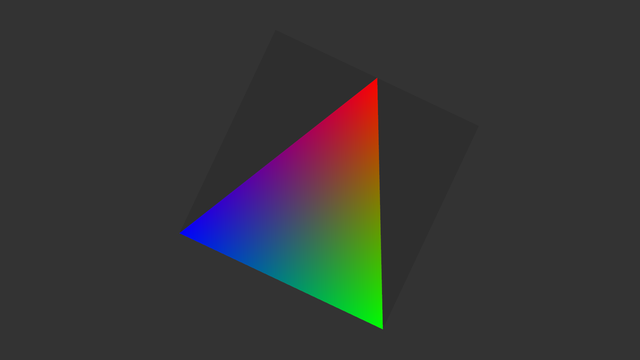
As in the normal case of custom rendering in Cornerstone, we have to override at least one of the rendering functions of widget. In this example MultiWidgets::Widget::renderContent is overriden. Here is the declaration of our widget:
The important bits of this example lay in MultiWidgets::Widget::renderContent renderContent function. The most important part is the creation of Luminous::CustomOpenGL-object. It enables the execution of direct OpenGL-commands.
We have to apply the model and view transformation matrices to OpenGL by hand when bypassing the Cornerstone renderer. The needed transformations can be fetched from Luminous::RenderContext. The transformation from the model coordinates of the widget to the world coordinates of the application is achived by calling transform() or transform3() depending whether 4x4- or 3x3-matrix is required. The transformation from world coordinates (pixels) to the projected eye coordinates (clipping coordinates) is achieved by calling viewTransform(). As can be seen from the example, the internal matrices used in Cornerstone renderer don't match precisely to the ones used in fixed pipeline of OpenGL 1.1. Because Nimble::Matrix4 is in row-major form we need to transpose matrix to column-major form before feeding it to OpenGL.
The rest of the rendering function is just the specification of the triangle to be rendered.
In the main function of the example we just create MultiWidgets::Application and a single LegacyGLWidget as a child of the main layer. The full source code for the example can be seen below:

