This example shows how to create custom operators in JavaScript code using MultiWidgets.JavaScriptOperator.
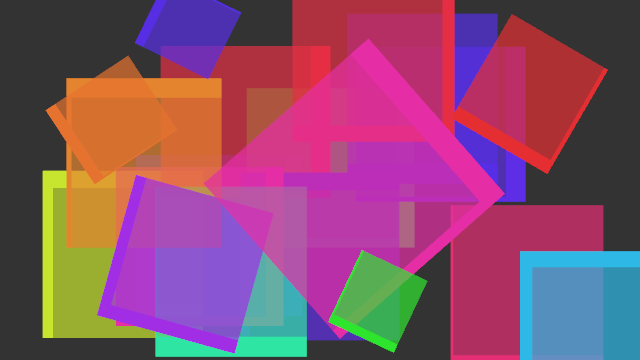
Screenshot of JavaScriptOperator example
This example will show how to override MultiWidgets.Operator.update() and MultiWidgets.Operator.input() -functions in JavaScript. We will also override MultiWidgets.Operator.reset()-function to make it possible to reset the operator to its initial state. The example will follow similar code structure as used in JavaScriptWidget.js.
There is a initialization loop that creates some text widgets and adds our custom operator to all of those widgets.
var appsize = $.app.mainLayer().size();
for (var i = 0; i < 20; ++i) {
var w = new MultiWidgets.TextWidget();
w.setSize(150, 150);
w.setFontSize(12.0);
w.setCenterLocation(new Nimble.Vector2f(
(0.2+0.6*Math.random()) * appsize.width(),
(0.2+0.6*Math.random()) * appsize.height()));
var c = Radiant.ColorUtils.hsvTorgb(new Radiant.Color(Math.random(), 0.8, 0.9, 0.7));
w.setBackgroundColor(c);
c.setAlpha(1.0);
w.setBorderColor(c);
w.setBorderStyle(Stylish.Border.STYLE_SOLID);
w.addOperator(create());
$.app.mainLayer().addChild(w);
}
The actual operator is created in function create. We start the initialization by instantiating a new MultiWidgets.JavaScriptOperator.
function create() {
var o = new MultiWidgets.JavaScriptOperator();
After initialization, we add all overriden functions to the operator, and finally we initialize all custom properties we need to add to the operator by calling reset(). We could have initialized the same values also in the create -function by writing code like o.borderAnimation = ...;
We will override MultiWidgets.Operator.update with a javascript function by calling MultiWidgets.JavaScriptOperator.onUpdate. Like with JavaScriptWidget, this will point to the operator itself when the function is called. All function prototypes are identical to the C++ versions.
Our version of the update will make a simple rotating effect by animating widget borders. The animation will fade in gradually in one second, and a operator will have a individual random rotation velocity.
o.onUpdate(function(w, frameInfo) {
this.borderAnimation += frameInfo.dt() * this.borderAnimationSpeed;
this.fadeIn = Math.min(1, this.fadeIn + frameInfo.dt());
var x = this.fadeIn * 20.0 * Math.cos(this.borderAnimation);
var y = this.fadeIn * 20.0 * Math.sin(this.borderAnimation);
w.setBorderFrame(new Nimble.Frame4f(Math.max(0, y), Math.max(0, x), Math.max(0, -y), Math.max(0, -x)));
});
Our MultiWidgets.Operator.reset-function is trivial, it will just set new initial state and reset fade-in effect.
o.onReset(function() {
this.borderAnimation = Math.random() * 100;
this.borderAnimationSpeed = -10+20*Math.random();
this.fadeIn = 0;
});
In the input handling, we just iterate all fingers and print some information about them in the widget. All C++ vector/list -types are automatically converted to JavaScript Arrays when reading a variable or calling a function. We make a temporary fingers Array so that the conversion happens only once in a frame per widget.
o.onInput(function(w, gm, trackedObjects, dt) {
var fingers = trackedObjects.fingers();
var str = "";
for (var i = 0; i < fingers.length; i += 1) {
var finger = fingers[i];
str += sprintf("Finger #%d (%.1f %.1f)\n", finger.id(), finger.tipLocation().x, finger.tipLocation().y);
}
w.setText(str);
});
You can also override MultiWidgets.Operator.added, MultiWidgets.Operator.removed, MultiWidgets.Operator.interactionBegin and MultiWidgets.Operator.interactionEnd, but this example doesn't use them.
The full source code is shown below:
function create() {
var o = new MultiWidgets.JavaScriptOperator();
o.onUpdate(function(w, frameInfo) {
this.borderAnimation += frameInfo.dt() * this.borderAnimationSpeed;
this.fadeIn = Math.min(1, this.fadeIn + frameInfo.dt());
var x = this.fadeIn * 20.0 * Math.cos(this.borderAnimation);
var y = this.fadeIn * 20.0 * Math.sin(this.borderAnimation);
w.setBorderFrame(new Nimble.Frame4f(Math.max(0, y), Math.max(0, x), Math.max(0, -y), Math.max(0, -x)));
});
o.onReset(function() {
this.borderAnimation = Math.random() * 100;
this.borderAnimationSpeed = -10+20*Math.random();
this.fadeIn = 0;
});
o.onInput(function(w, gm, trackedObjects, dt) {
var fingers = trackedObjects.fingers();
var str = "";
for (var i = 0; i < fingers.length; i += 1) {
var finger = fingers[i];
str += sprintf("Finger #%d (%.1f %.1f)\n", finger.id(), finger.tipLocation().x, finger.tipLocation().y);
}
w.setText(str);
});
o.reset();
return o;
}
var appsize = $.app.mainLayer().size();
for (var i = 0; i < 20; ++i) {
var w = new MultiWidgets.TextWidget();
w.setSize(150, 150);
w.setFontSize(12.0);
w.setCenterLocation(new Nimble.Vector2f(
(0.2+0.6*Math.random()) * appsize.width(),
(0.2+0.6*Math.random()) * appsize.height()));
var c = Radiant.ColorUtils.hsvTorgb(new Radiant.Color(Math.random(), 0.8, 0.9, 0.7));
w.setBackgroundColor(c);
c.setAlpha(1.0);
w.setBorderColor(c);
w.setBorderStyle(Stylish.Border.STYLE_SOLID);
w.addOperator(create());
$.app.mainLayer().addChild(w);
}

