This example shows how to create custom widgets in JavaScript code using MultiWidgets.JavaScriptWidget.
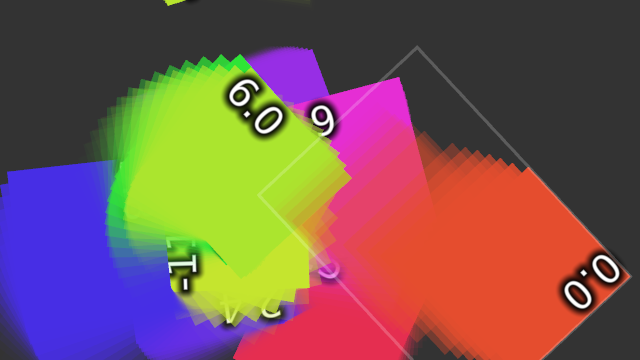
Screenshot of JavaScriptWidget example
Our custom widget will have overriden rendering, update and input processing functions. The widget will store its transformation matrix into short history buffer, and render previous locations of the widget as a faded color, somewhat similar to a simple motion blur.
Function create() works as a constructor for our custom widget and returns a new instance of MultiWidgets.JavaScriptWidget with our custom callbacks. This function is called in the initialization loop that creates 10 widgets. We place the widgets on the center of the screen and choose a nice random color with Radiant.ColorUtils.hsvTorgb.
var appsize = $.app.mainLayer().size();
for (var i = 0; i < 10; ++i) {
var w = create();
w.setSize(150, 150);
w.setLocation(appsize.width() * 0.5, appsize.height() * 0.5);
w.setBackgroundColor(Radiant.ColorUtils.hsvTorgb(new Radiant.Color(Math.random(), 0.8, 0.9, 1.0)));
$.app.mainLayer().addChild(w);
}
In create() we first make a new instance of JavaScriptWidget. After that we add some new properties to the widget.
history is a list where we add the widget rectangle and transformation matrix every in update().historySize is the maximum size of the history list, in frames.boundingBox is what we return in our overriden version of MultiWidgets.Widget.boundingRect.rotationSpeed specifies how fast the widget rotates when it's not touched. This is animated in our update() -function.
Finally we set the widget origin to be something between -2 and 3, this way we can animate the center locations of the widgets and still get them to stay in a certain form.
function create() {
var w = new MultiWidgets.JavaScriptWidget();
w.history = [];
w.historySize = 15;
w.boundingBox = w.borderBox();
w.rotationSpeed = 0;
w.setOrigin(new Nimble.Vector2f(Math.random()*5-2, Math.random()*5-2));
We can override MultiWidgets.Widget.update -function by registering a new function as a parameter to MultiWidgets.JavaScriptWidget.onUpdate. Like with all JavaScriptWidget callbacks, this will point to the widget itself when the function is called. All function prototypes are identical to the C++ versions.
Update will rotate idle widgets and store the transformation matrix to the history list in parent coordinate system. Then it will go through the history, calculate new bounging box based on the rectangles in the history, and finally convert the bounding box back to the widget coordinate system, as required by MultiWidgets.Widget.boundingRect.
w.onUpdate(function(frameInfo) {
if (!this.hasInteraction()) {
w.rotationSpeed += (Math.random() - 0.5);
this.setRotationAboutCenter(this.rotation() + frameInfo.dt() * w.rotationSpeed);
}
var matrix = this.transform();
var rect = new Nimble.Rectangle(this.borderBox());
rect.transform(matrix);
this.history.push([rect, this.transform3D()]);
if (this.history.length > this.historySize) {
this.history.shift();
}
for (var i = 0; i < this.history.length-1; i++) {
rect = Nimble.Rectangle.merge(rect, this.history[i][0]);
}
rect.transform(matrix.inverse());
this.boundingBox = rect.boundingBox();
});
In our custom background renderer we go though the history and render the widget using the stored transformations. We set the alpha value in the fill color so that older rects are more transparent.
w.onRenderBackground(function(r) {
var style = new Luminous.Style();
var bg = this.backgroundColor();
for (var i = 0; i < this.history.length; i++) {
var opacity = (i+1)/this.history.length;
bg.setAlpha(opacity * opacity);
style.setFillColor(bg);
r.popTransform();
r.pushTransformRightMul(this.history[i][1]);
r.drawRect(this.contentBox(), style);
}
});
In renderBorder we visualize exactly the same thing we return in boundingRect, but only in active widgets. Since we have overriden the normal MultiWidgets.Widget.renderBorder, the default border isn't rendered at all.
w.onRenderBorder(function(r) {
if (!this.hasInteraction())
return;
var style = new Luminous.Style();
style.setStrokeColor(1,1,1,0.2);
style.setStrokeWidth(3);
r.drawRect(this.boundingBox, style);
});
The actual content of the widget is the text that contains the rotation speed of the widget.
w.onRenderContent(function(r) {
var style = new Luminous.TextStyle();
style.setFillColor(1,1,1,1);
style.setGlowColor(0,0,0,1);
style.setGlow(0.5);
style.setPointSize(30);
r.drawText(this.rotationSpeed.toFixed(1), this.contentBox(), style);
});
Any custom input handling in JavaScriptWidget must be handled in processInput. We still have normal input-flags enabled in the widget, so we are not overriding any normal behaviour, we are just adding new functionality.
In processInput we send all widgets to fly towards any fingers on the screen.
w.onProcessInput(function(gm, dt) {
for (var i = 0; i < gm.clippedObjectCount(); i++) {
var finger = gm.getClippedObject(i).asFinger();
if (finger.isNull())
continue;
var floc = this.mapToParent(gm.project(finger.tipLocation()));
var wloc = this.location();
var dir = new Nimble.Vector2f(floc.x - wloc.x, floc.y - wloc.y);
this.setVelocity(dir.x*0.1 + this.velocity().x, dir.y*0.1 + this.velocity().y);
}
});
Whenever a widget renders something outside its borders, it's also required to implement a custom MultiWidgets.Widget.boundingRect -function, since the bounding rectangle is used for clipping. All work is already been done in update(), we just return the ready Nimble.Rectf.
w.onBoundingRect(function() {
return this.boundingBox;
});
The full source code is shown below:
function create() {
var w = new MultiWidgets.JavaScriptWidget();
w.history = [];
w.historySize = 15;
w.boundingBox = w.borderBox();
w.rotationSpeed = 0;
w.setOrigin(new Nimble.Vector2f(Math.random()*5-2, Math.random()*5-2));
w.onRenderBackground(function(r) {
var style = new Luminous.Style();
var bg = this.backgroundColor();
for (var i = 0; i < this.history.length; i++) {
var opacity = (i+1)/this.history.length;
bg.setAlpha(opacity * opacity);
style.setFillColor(bg);
r.popTransform();
r.pushTransformRightMul(this.history[i][1]);
r.drawRect(this.contentBox(), style);
}
});
w.onRenderBorder(function(r) {
if (!this.hasInteraction())
return;
var style = new Luminous.Style();
style.setStrokeColor(1,1,1,0.2);
style.setStrokeWidth(3);
r.drawRect(this.boundingBox, style);
});
w.onRenderContent(function(r) {
var style = new Luminous.TextStyle();
style.setFillColor(1,1,1,1);
style.setGlowColor(0,0,0,1);
style.setGlow(0.5);
style.setPointSize(30);
r.drawText(this.rotationSpeed.toFixed(1), this.contentBox(), style);
});
w.onUpdate(function(frameInfo) {
if (!this.hasInteraction()) {
w.rotationSpeed += (Math.random() - 0.5);
this.setRotationAboutCenter(this.rotation() + frameInfo.dt() * w.rotationSpeed);
}
var matrix = this.transform();
var rect = new Nimble.Rectangle(this.borderBox());
rect.transform(matrix);
this.history.push([rect, this.transform3D()]);
if (this.history.length > this.historySize) {
this.history.shift();
}
for (var i = 0; i < this.history.length-1; i++) {
rect = Nimble.Rectangle.merge(rect, this.history[i][0]);
}
rect.transform(matrix.inverse());
this.boundingBox = rect.boundingBox();
});
w.onProcessInput(function(gm, dt) {
for (var i = 0; i < gm.clippedObjectCount(); i++) {
var finger = gm.getClippedObject(i).asFinger();
if (finger.isNull())
continue;
var floc = this.mapToParent(gm.project(finger.tipLocation()));
var wloc = this.location();
var dir = new Nimble.Vector2f(floc.x - wloc.x, floc.y - wloc.y);
this.setVelocity(dir.x*0.1 + this.velocity().x, dir.y*0.1 + this.velocity().y);
}
});
w.onBoundingRect(function() {
return this.boundingBox;
});
w.onInteractionBegin(function() {
w.rotationSpeed = 0;
});
return w;
}
var appsize = $.app.mainLayer().size();
for (var i = 0; i < 10; ++i) {
var w = create();
w.setSize(150, 150);
w.setLocation(appsize.width() * 0.5, appsize.height() * 0.5);
w.setBackgroundColor(Radiant.ColorUtils.hsvTorgb(new Radiant.Color(Math.random(), 0.8, 0.9, 1.0)));
$.app.mainLayer().addChild(w);
}

