This example shows how to use event passing framework in Cornerstone. In this example we create an application where we have four buttons. Each press of the button creates an event which will be sent to the receiving object.
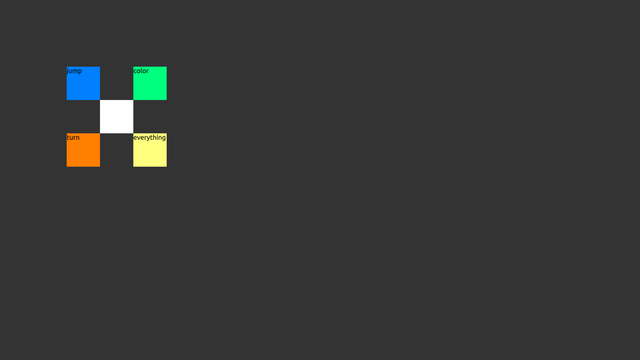
Screenshot of the Events example
We have to override default implementation of eventProcess-function to be able to handle custom messages. For this we extend MultiWidgets::Widget-class with Receiver-class.
{
public:
Receiver();
virtual ~Receiver();
private:
void jump();
void colorize();
void turn();
private:
};
The class defines three custom member-functions, namely jump, colorize and turn. These functions will be called in eventProcess. For the implementation of these functions we need random numbers which are supplied by the member variable m_random.
In the constructor of Receiver we register events handled by the object by calling eventAddIn. These are plainly for the benefit of user. If events aren't added in, warnings are generated when running the program. All input is ignored by setting appropriate input flags.
Receiver::Receiver()
{
setCSSType("Receiver");
eventAddIn("jump");
eventAddIn("turn");
eventAddIn("colorize");
}
The actual handling of the events is done in eventProcess-function. We decide the correct action by inspecting message id. If the message is not processed in this callback, it should be passed on to the parent class for processing. This is not mandatory, but this way you can rely on the event handling of the parent class.
{
if(messageId == "jump") jump();
else if(messageId == "turn") turn();
else if(messageId == "colorize") colorize();
else Widget::eventProcess(messageId, data);
}
When "jump" event is received, we calculate a new random location on the parent and create an animation to that point. We animate the center of the widget, since that works better in conjunction with the potential simultaneous rotations.
void Receiver::jump()
{
m_random.rand0X(parent()->height()));
auto anim = std::make_shared<MultiWidgets::AnimatorCenterLocation>();
anim->bouncyAnimation(0.5f, mapToParent(size().toVector() * 0.5f), target);
addOperator(anim);
}
Actions for "turn"- and "colorize"-events are similar. They animate attributes of the object based on random values.
Now we have implemented the logic for handling events. We still have to register receiving object for listening the corresponding events. We define Background-class for holding the objects sending events and an instance of Receiver. In the constructor of Background we first create Receiver object and make sure that all of the input is forwarded to child widgets.
auto receiver = MultiWidgets::create<Receiver>();
addChild(receiver);
setInputFlags(INPUT_PASS_TO_CHILDREN | INPUT_OPERATORS);
After that we create the buttons for sending the events. The first button makes the receiver object jump. Whenever its "interaction-begin" event is triggered, the "jump" event is sent to receiver. This functionality is achieved by calling eventAddListener-function.
auto b1 = MultiWidgets::create<MultiWidgets::TextWidget>("jump");
b1->setCSSId("jump-button");
b1->setInputFlags(INPUT_SINGLE_TAPS);
b1->eventAddListener("interaction-begin", "jump", receiver);
addChild(b1);
Initializations of color- and turn-buttons are similiar to jump-button. The last button is a bit different. It sends three different events when interaction begins. This can be achieved by calling eventAddListener-function multiple times.
auto b4 = MultiWidgets::create<MultiWidgets::TextWidget>("everything");
b4->setCSSId("everything-button");
b4->setInputFlags(INPUT_SINGLE_TAPS);
b4->eventAddListener("interaction-begin", "jump", receiver);
b4->eventAddListener("interaction-begin", "turn", receiver);
b4->eventAddListener("interaction-begin", "colorize", receiver);
addChild(b4);
The main function just defines the CSS and initializes Application and background widget. The full source code is shown below:
#include <MultiWidgets/Application.hpp>
#include <MultiWidgets/Animators.hpp>
#include <MultiWidgets/TextWidget.hpp>
#include <Nimble/Random.hpp>
namespace Examples {
{
public:
Receiver();
virtual ~Receiver();
private:
void jump();
void colorize();
void turn();
private:
};
{
public:
Background();
virtual ~Background();
};
Receiver::Receiver()
{
setCSSType("Receiver");
eventAddIn("jump");
eventAddIn("turn");
eventAddIn("colorize");
}
Receiver::~Receiver() {}
void Receiver::jump()
{
m_random.rand0X(parent()->height()));
auto anim = std::make_shared<MultiWidgets::AnimatorCenterLocation>();
anim->bouncyAnimation(0.5f, mapToParent(size().toVector() * 0.5f), target);
addOperator(anim);
}
void Receiver::turn()
{
auto anim = std::make_shared<MultiWidgets::AnimatorRotation>();
anim->bouncyAnimation(0.5f, rotation(), m_random.randXX(5.0f));
addOperator(anim);
}
void Receiver::colorize()
{
auto anim = std::make_shared<MultiWidgets::AnimatorVector4f>("background-color");
m_random.rand0X(1.0f), backgroundColor()[3]);
anim->bouncyAnimation(0.2f, backgroundColor(), target);
addOperator(anim);
}
{
if(messageId == "jump") jump();
else if(messageId == "turn") turn();
else if(messageId == "colorize") colorize();
else Widget::eventProcess(messageId, data);
}
Background::Background()
{
setCSSType("Background");
auto receiver = MultiWidgets::create<Receiver>();
addChild(receiver);
setInputFlags(INPUT_PASS_TO_CHILDREN | INPUT_OPERATORS);
auto b1 = MultiWidgets::create<MultiWidgets::TextWidget>("jump");
b1->setCSSId("jump-button");
b1->setInputFlags(INPUT_SINGLE_TAPS);
b1->eventAddListener("interaction-begin", "jump", receiver);
addChild(b1);
auto b2 = MultiWidgets::create<MultiWidgets::TextWidget>("turn");
b2->setCSSId("turn-button");
b2->setInputFlags(INPUT_SINGLE_TAPS);
b2->eventAddListener("interaction-begin", "turn", receiver);
addChild(b2);
auto b3 = MultiWidgets::create<MultiWidgets::TextWidget>("color");
b3->setCSSId("colorize-button");
b3->setInputFlags(INPUT_SINGLE_TAPS);
b3->eventAddListener("interaction-begin", "colorize", receiver);
addChild(b3);
auto b4 = MultiWidgets::create<MultiWidgets::TextWidget>("everything");
b4->setCSSId("everything-button");
b4->setInputFlags(INPUT_SINGLE_TAPS);
b4->eventAddListener("interaction-begin", "jump", receiver);
b4->eventAddListener("interaction-begin", "turn", receiver);
b4->eventAddListener("interaction-begin", "colorize", receiver);
addChild(b4);
}
Background::~Background() {}
}
int main(int argc, char** argv)
{
if(!app.
init(argc, argv))
return 1;
auto b = MultiWidgets::create<Examples::Background>();
}

