All Classes Namespaces Functions Variables Typedefs Enumerations Enumerator Friends Pages
BookExample.cpp

The book widget is a widget that can be used to display a series of images as the pages of a flippable book. This example demonstrates how to use the BookWidget that is part of Cornerstone SDK.
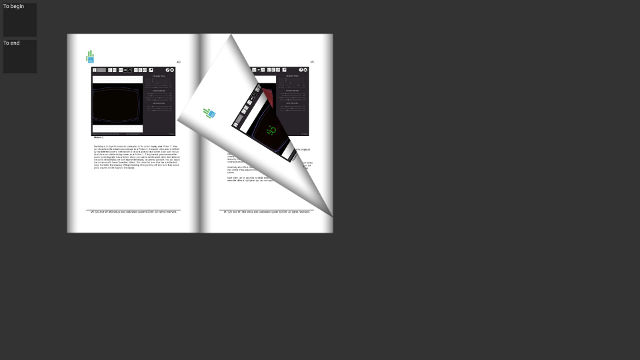
BookExample-screenshot.png
Screenshot of the BookExample application

In principle the usage of the widget is very simple: just instruct the widget to load a directory that contains a set of images. Here we show step-by-step how to do this.

We begin by parsing the command line arguments:

Valuable::AttributeString dirname( & opts, "dir", QString());
Valuable::CmdParser::parse(argc, argv, opts);

The code defines an Attribute dirname and adds it to a dummy Node object opts. The attribute is used to store the value of a command line argument named "dir" (ie. –dir path/to/some/dir) to the variable. By calling parse the command line parser scans the list of command line arguments and automatically fills the attributes of the given node with corresponding values.

Alternatively we could have created dirname later and given app as a host object for the AttributeString. Application init-function runs CmdParser automatically for all attributes added to the application. The downside of this approach is that the arguments are parsed only when init returns.

Next we check that the application was started with the correct (and non-empty) command line parameter, printing an error and exiting if not:

if(dirname->isEmpty()) {
Radiant::error("%s : Use --dir <directory> to specify directory for loading images",
argv[0]);
return -1;
}

At this point we initialize the application in the exact same way as in other examples:

bool ok = app.init(argc, argv);
if(!ok)
return 1;

Next we actually create the book widget, set its size and location and then tell the widget to load the directory that was passed in as a command line argument:

MultiWidgets::BookWidgetPtr book = MultiWidgets::create<MultiWidgets::BookWidget>();
// Set size and location
book->setSize(Nimble::SizeF(800, 600));
book->setLocation(200, 100);
// Load the contents of the book
book->load(dirname.asString());
// Add widget to application
app.mainLayer()->addChild(book);

This is all that is needed to get a working book widget. To showcase some of the API of the book widget we still create two buttons that can be used to open the first and last pages of the widget:

// Button that opens the first page
MultiWidgets::TextWidgetPtr toBegin = MultiWidgets::create<MultiWidgets::TextWidget>("To begin");
toBegin->eventAddListener("interaction-begin", [&] { book->openPage(0); } );
toBegin->setLocation(10, 10);
app.mainLayer()->addChild(toBegin);
// Button that opens the last page
MultiWidgets::TextWidgetPtr toEnd = MultiWidgets::create<MultiWidgets::TextWidget>("To end");
toEnd->eventAddListener("interaction-begin", [&] { book->openPage(book->pageCount()-1); } );
toEnd->setLocation(10, 120);
app.mainLayer()->addChild(toEnd);

Lastly, we still need to run the application of course:

return app.run();

The full source code for the complete example is listed below:

/* Copyright (C) 2007-2013 Multi Touch Oy, Finland, http://www.multitaction.com
*
* This file is part of MultiTouch Cornerstone.
*
* All rights reserved. You may use this file only for purposes for which you
* have a specific, written permission from Multi Touch Oy.
*
*/
#include <MultiWidgets/Application.hpp>
#include <MultiWidgets/BookWidget.hpp>
#include <MultiWidgets/TextWidget.hpp>
#include <Valuable/CmdParser.hpp>
int main(int argc, char ** argv)
{
Valuable::AttributeString dirname( & opts, "dir", QString());
Valuable::CmdParser::parse(argc, argv, opts);
if(dirname->isEmpty()) {
Radiant::error("%s : Use --dir <directory> to specify directory for loading images",
argv[0]);
return -1;
}
bool ok = app.init(argc, argv);
if(!ok)
return 1;
MultiWidgets::BookWidgetPtr book = MultiWidgets::create<MultiWidgets::BookWidget>();
// Set size and location
book->setSize(Nimble::SizeF(800, 600));
book->setLocation(200, 100);
// Load the contents of the book
book->load(dirname.asString());
// Add widget to application
app.mainLayer()->addChild(book);
// Button that opens the first page
MultiWidgets::TextWidgetPtr toBegin = MultiWidgets::create<MultiWidgets::TextWidget>("To begin");
toBegin->eventAddListener("interaction-begin", [&] { book->openPage(0); } );
toBegin->setLocation(10, 10);
app.mainLayer()->addChild(toBegin);
// Button that opens the last page
MultiWidgets::TextWidgetPtr toEnd = MultiWidgets::create<MultiWidgets::TextWidget>("To end");
toEnd->eventAddListener("interaction-begin", [&] { book->openPage(book->pageCount()-1); } );
toEnd->setLocation(10, 120);
app.mainLayer()->addChild(toEnd);
return app.run();
}