MultiTouch Cornerstone works with all 3rd party touch displays that support the following interface standards:
3rd party hardware support is a commercial feature and requires a license to be purchased. Please contact MultiTouch sales at sales@multitouch.fi for more information.
Windows 7 and Windows 8 implement touch interface support in the operating system level, getting information from touchscreens and passing that to applications as touch events.
Cornerstone supports this form of touch import automatically and all Windows Touch events are mapped to Cornerstone touch events without any additional configuration. Directly after installation, Cornerstone supports input from two fingers. To upgrade to unlimited number of touch points, a separate license is needed. To obtain a license, please contact sales at http://www.multitaction.com/contact/.
The license activation process is as follows:
In Windows 7 the default touch settings cause latency from between touch input (from a display) and touch reporting (to applications). This manifests itself as difficulties when performing quick gestures, such as single-taps.
The problems are caused by settings in the Windows Touch "press and hold" gesture processing. With this gesture processing Windows delays the delivery of touch information to applications.
The issues can be remedied by disabling the "press and hold" gesture from Windows. The process for this operation is described below.
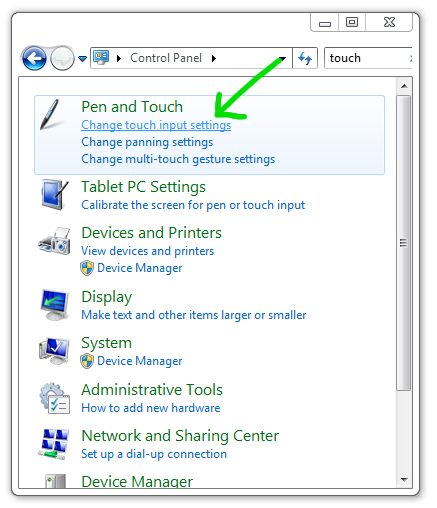
Step 1: Open Windows Control Panel and from "Pen and Touch" section open "Change touch input settings".
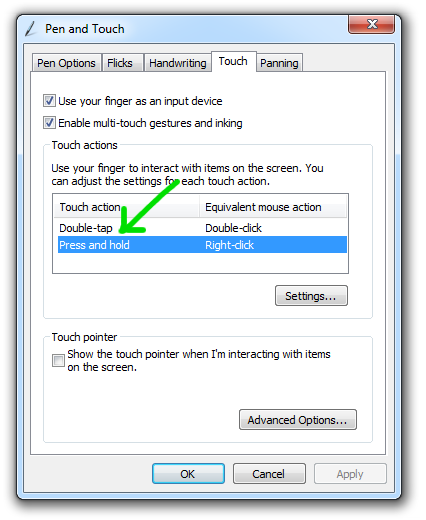
Step 2: Double-click "Press and hold" item from the "Touch" tab
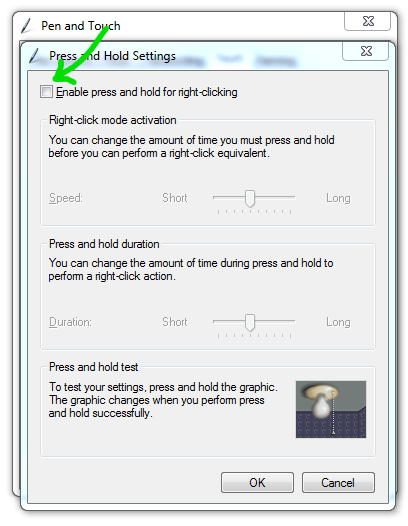
Step 3: Disable the "press and hold for right-clicking" option
TUIO is a general standard for touch event transfer over Internet, using the UDP protocol.
To use TUIO input with Cornerstone, a separate license is needed. To obtain a license, please contact sales at http://www.multitaction.com/contact/.
Cornerstone needs to be configured to use TUIO input functionality. This is done by adjusting the main touch-tracking configuration file (config.txt) for Cornerstone. Below is an example configuration file for using TUIO touch messages with Cornerstone:
The configuration parameters in the file have these meanings:
host
The IP address for listening to the incoming TUIO events. The default hostname (0.0.0.0) is typically useful as it captures TUIO messages from all interfaces without manual configuration.
port
The UDP port that is used to receive TUIO messages. The default TUIO port is 3333.
input-resolution
TUIO sends data in relative coordinates between 0 and 1. This parameter specifies the resolution the input data must be scaled to. By default this is detected from the active screen.xml config. Typical other values might be "1920 1080" or "3840 1080".
input-translate = "0 0"
This parameter can be used to move (translate) the touch coordinates by some fixed offset. This offset is defined in graphics coordinates. For most installations there is no need to set this value. The potential use cases are when part of the application is running on a touch screen and part of the application is running on a non-interactive screen, for example a projector used for just visualization.
input-rotate
This parameter can be used to rotate touch coordinates by some number of degrees. The typical use case for this parameter is with rotated displays, for example with portrait-mode installations.
input-scale
The TUIO input coordinates can also be scaled if necessary. This might be useful in cases where the display resolution differs from the TUIO tracker resolution. Typical use cases would be the same as for the "input-translate" parameter.

