All Classes Namespaces Functions Variables Typedefs Enumerations Enumerator Friends Pages
ViewExample.cpp

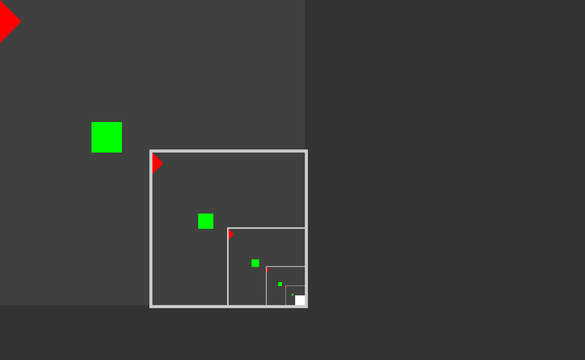
This example demonstrates MultiWidgets::ViewWidget. ViewWidgets can be used as viewports or cameras. They can be placed like normal widgets, but as their content they can display another part of the widget hierarchy.
ViewExample-screenshot.png
Screenshot of the ViewExample example

ViewWidget is created like a normal widget, but they take an additional widget as scene parameter. The scene is the widget that is visualized inside the view. It can be though of as a target object the viewport or camera is looking at. In this example, we create a ViewWidget and point it to the main layer of the application:

auto v = MultiWidgets::create<MultiWidgets::ViewWidget>(app.mainLayer());

ViewWidgets also support additional transformation that is applied when visualizing the scene widget. This is called the view transform. In this example, we want the entire content of the main layer to be visible in the view so we use MultiWidgets::ViewWidget::frameRect function to calculate the transform for us:

v->frameRect(app.mainLayer()->contentBox());

What this does is create a view transform where the given rectangle is framed by the viewport.

As the ViewWidget itself is a child of the application main layer and the target scene of the ViewWidget is the main layer, this example produces a recursive view. The ViewWidget is looking at itself. To avoid infinite loops, Luminous::RenderContext provides a limit for the recursion depth. It can be adjusted using the Luminous::RenderContext::setRecursionLimit function.

Typically the ViewWidgets are used to create live previews to parts of applications. Recursion is rarely required.

The full source code for the example is listed below:

/* Copyright (C) 2007-2013 Multi Touch Oy, Finland, http://www.multitaction.com
*
* This file is part of MultiTouch Cornerstone.
*
* All rights reserved. You may use this file only for purposes for which you
* have a specific, written permission from Multi Touch Oy.
*
*/
#include <MultiWidgets/Application.hpp>
#include <MultiWidgets/ViewWidget.hpp>
int main(int argc, char ** argv)
{
if(!app.init(argc, argv))
return 1;
app.mainLayer()->setBackgroundColor(Radiant::Color(0.25f, 0.25f, 0.25f, 1.0f));
app.mainLayer()->setSize(1000, 1000);
// Create a view under the mainLayer widget looking at the mainLayer widget (recursion)
auto v = MultiWidgets::create<MultiWidgets::ViewWidget>(app.mainLayer());
app.mainLayer()->addChild(v);
v->setBorderStyle(Stylish::Border::STYLE_SOLID);
v->setBorderWidth(10.f);
v->setLocation(app.mainLayer()->size().toVector() / 2.f);
v->setSize(Nimble::SizeF(500, 500));
v->frameRect(app.mainLayer()->contentBox());
v->setAutoRaiseToTop(false);
// Add two child widgets under the mainLayer
auto w1 = MultiWidgets::create<MultiWidgets::Widget>();
app.mainLayer()->addChild(w1);
w1->setLocation(Nimble::Vector2(0, 0));
w1->setRotation(3.1415f / 4.f);
w1->setBackgroundColor(Radiant::Color(1.f, 0.f, 0.f)); // Bright red square
auto w2 = MultiWidgets::create<MultiWidgets::Widget>();
app.mainLayer()->addChild(w2);
w2->setLocation(Nimble::Vector2(300, 400));
w2->setBackgroundColor(Radiant::Color(0.f, 1.f, 0.f)); // Bright green square
// Run the application:
return app.run();
}