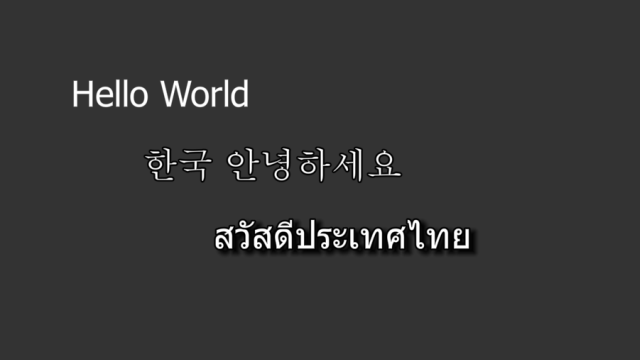
This example demonstrates how to easily make your text look better by using simple text effects. It also demostrates Unicode support with UTF-8 encoded texts in Cornerstone for different languages and the use of a CSS file for styling.
We begin by including the header files of classes we need and creating and initializing an instance of our application class:
All the text effects can be configured through attributes. While it is possible to set the attributes directly from C++ code, we opt to use an external CSS file for this. This allows us to easily change the attributes by simply modifying the text file. There is no need to recompile the application and modifying the CSS file will cause the attributes to update immediately, thus allowing rapid development and iteration.
Next we create some widgets. For displaying simple text, we use the MultiWidgets::TextWidget class. Our first instance is simple plain text without any effects. Widget attributes come from TextWidget section in the CSS-file.
Second widget uses the same basic attributes, but also adds a stroke effect, which makes to text stand out from the background more. The text in the widget is also read from the CSS file. In this case we can see some non-latin characters appearing to the screen.
Note! Make sure your development enviroment is saving the .cpp and .css files with UTF-8 encoding. Otherwise the characters might mess up when you save the files, and fonts are not necessarily rendered properly if the file encoding is, for example, ASCII.
Last widget shows how we can also modify the attribute values in code instead of the CSS file. With this approach, the values are hard-coded in C++ and cannot be changed at runtime, unlike with CSS.
Widgets are already added to the screen, but we have to modify the locations. Otherwise they will overlap and hide each others. This is easily done by iterating through the mainlayer's children.
As last step we run the application:
The full source code for the complete example is listed below:

