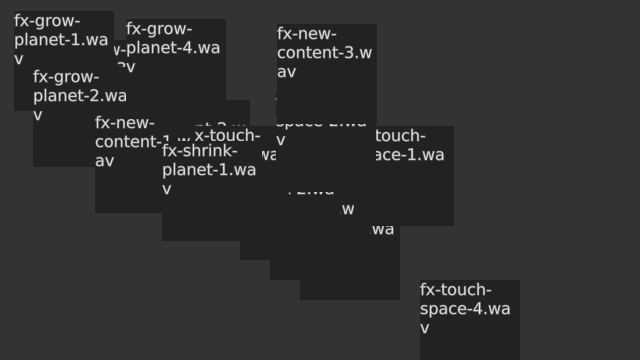
Screenshot of the PositionalAudioExample example
The Positional Sounds example demonstrates how to use the Resonant audio library in Cornerstone to implement positional sound playback.
In this example, we setup a simple two-speaker setup on a full HD screen, then read all audio samples from a directory and create a widget for each found audio sample. When the user taps on one of these widgets, the audio associated with that widget is played. The audio playback will automatically pan the audio, so that if the widget is near the left edge of the screen when tapped, the sound will come from the left spear. If it is near the right edge, sound will come from the right speaker. By default, the application tries to load audio files from a directory called 'Sounds'. To specify a custom directory launch the application with the –dir <path> argument.
We start by implementing a custom operator that is used to play the audio samples. It takes an audio filename as a parameter in its constructor. We also keep a simple frame counter that we use to prevent too many samples from playing simultaneously:
{
private:
QString m_filename;
int m_idle;
The actual playback logic is defined in our operator's input function:
{
return;
if(m_idle < 10) {
m_idle = 0;
return;
}
auto player = Resonant::DSPNetwork::instance()->samplePlayer();
if(!player) {
return;
}
if(m_noteInfo.isPlaying()) {
player->stopSample(m_noteInfo);
}
else {
m_noteInfo = player->playSampleAtLocation(m_filename.toUtf8(), 0.5f, 1.0f, loc, 0);
}
m_idle = 0;
}
In this function, we first check if any tracked objects, for example fingers, are touching the widget. If none are found, we just return. We then check our frame counter to prevent too many audio samples from playing at once. If there is no interaction on the widget, we reset the frame counter:
As audio configuration is defined in screen coordinates, we need to convert the widget's center location to screen coordinates. Once we have this, we access an instance of the Resonant::ModuleSamplePlayer, and play the audio file that was defined for this operator.
We also implement a custom update function for the operator. Here we just increment our frame counter.
{
m_idle++;
if(m_noteInfo.isPlaying()) {
}
else {
}
}
In our main function, we begin by creating an instance of the MultiWidgets::Application class. We want the user to able specify the directory for the sound files as a command line argument. We do this by adding a new string attribute to the application called dir, with the default value of Sounds:
int main(int argc, char ** argv)
{
bool ok = app.
init(argc, argv);
if(!ok)
return 1;
Unless the user specifies another directory using the –dir <path> syntax, we will try to load sounds from the Sounds folder in a predetermined list of search paths, starting from the working directory. This is done by using the Radiant::ResourceLocator class. If we find no audio files, we just abort the application with an error message. We filter the searched directory with a mime type that finds all supported audio types:
auto dirs = Radiant::ResourceLocator::instance()->locate(soundDirectory);
if(dirs.empty()) {
Radiant::error(
"Could not locate directory \"%s\".", soundDirectory->toUtf8().data());
return 1;
}
if(!audioFiles.count()) {
"Please use --dir option to specify directory",
soundDirectory->toUtf8().data());
return 1;
}
For each audio file we create a text box that shows the name of the audio file. The widgets are located diagonally starting from the top-left corner of the scene.
for(int i = 0; i < audioFiles.count(); i++) {
MultiWidgets::TextWidgetPtr label =
MultiWidgets::create<MultiWidgets::TextWidget>(audioFiles.fileName(i));
label->setLocation(i * 30, i * 20);
label->setBorderWidth(2);
label->setBorderStyle(Stylish::Border::STYLE_SOLID);
label->setBorderColor(1, 1, 1, 1);
To play sounds when the widget receives interaction, we add the above operator to the widgets. For each widget we create a separate operator instance.
label->addOperator(std::make_shared<Examples::SoundOnInteractionBegin>(audioFiles.fileNameWithPath(i)));
Next we add an operator that keeps the widget inside the parent at all times, guaranteeing that widgets are not lost outside the screen.
label->addOperator(std::make_shared<MultiWidgets::StayInsideParentOperator>());
The sound positioning engine needs a so-called panner module that knows where each loudspeaker is. The sound positioning system uses this knowledge to direct the sounds to the nearest speaker depending on the screen location. Generally the loudspeaker configuration is stored in a configuration file. If the configuration file is missing, we make a guess that the user has a stereo sound system placed around a full-HD display.
See also the detailed audio panning documentation.
if(!Resonant::DSPNetwork::instance()->hasPanner()) {
Radiant::info(
"%s # Adding a panner to the DSP network", argv[0]);
auto panItem = std::make_shared<Resonant::DSPNetwork::Item>();
panItem->setModule(panner);
Resonant::DSPNetwork::instance()->addModule(panItem);
}
Finally we run the application. As soon as the user interacts with the text boxes corresponding audio sample is played through the loudspeaker that is closest to the widget center point.
The full source code for the entire example is listed below:
#include <MultiWidgets/Application.hpp>
#include <MultiWidgets/StayInsideParentOperator.hpp>
#include <MultiWidgets/TextWidget.hpp>
#include <Radiant/Directory.hpp>
#include <Radiant/ResourceLocator.hpp>
#include <Resonant/DSPNetwork.hpp>
#include <Resonant/ModulePanner.hpp>
#include <Resonant/ModuleSamplePlayer.hpp>
#include <Valuable/CmdParser.hpp>
#include <Valuable/AttributeString.hpp>
#include <QDir>
namespace Examples
{
{
private:
QString m_filename;
int m_idle;
public:
SoundOnInteractionBegin(const QString & filename)
: m_filename(filename)
, m_idle(10)
{}
virtual ~SoundOnInteractionBegin()
{}
{
return;
if(m_idle < 10) {
m_idle = 0;
return;
}
auto player = Resonant::DSPNetwork::instance()->samplePlayer();
if(!player) {
return;
}
if(m_noteInfo.isPlaying()) {
player->stopSample(m_noteInfo);
}
else {
m_noteInfo = player->playSampleAtLocation(m_filename.toUtf8(), 0.5f, 1.0f, loc, 0);
}
m_idle = 0;
}
{
m_idle++;
if(m_noteInfo.isPlaying()) {
}
else {
}
}
};
}
int main(int argc, char ** argv)
{
bool ok = app.
init(argc, argv);
if(!ok)
return 1;
auto dirs = Radiant::ResourceLocator::instance()->locate(soundDirectory);
if(dirs.empty()) {
Radiant::error(
"Could not locate directory \"%s\".", soundDirectory->toUtf8().data());
return 1;
}
if(!audioFiles.count()) {
"Please use --dir option to specify directory",
soundDirectory->toUtf8().data());
return 1;
}
for(int i = 0; i < audioFiles.count(); i++) {
MultiWidgets::TextWidgetPtr label =
MultiWidgets::create<MultiWidgets::TextWidget>(audioFiles.fileName(i));
label->setLocation(i * 30, i * 20);
label->setBorderWidth(2);
label->setBorderStyle(Stylish::Border::STYLE_SOLID);
label->setBorderColor(1, 1, 1, 1);
label->addOperator(std::make_shared<Examples::SoundOnInteractionBegin>(audioFiles.fileNameWithPath(i)));
label->addOperator(std::make_shared<MultiWidgets::StayInsideParentOperator>());
}
if(!Resonant::DSPNetwork::instance()->hasPanner()) {
Radiant::info(
"%s # Adding a panner to the DSP network", argv[0]);
auto panItem = std::make_shared<Resonant::DSPNetwork::Item>();
panItem->setModule(panner);
Resonant::DSPNetwork::instance()->addModule(panItem);
}
}

