All Classes Namespaces Functions Variables Typedefs Enumerations Enumerator Friends Pages
CustomKeyboardLayoutExample.cpp

The CustomKeyboardLayout example demonstrates how to define your own keyboard layouts and how to use them with TextEditWidget in Cornerstone. The example will load a custom keyboard layout from an XML file that we define and use it for the TextEditWidget that is placed on screen.
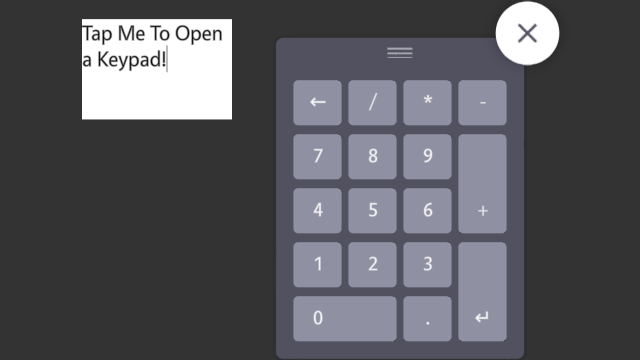
CustomKeyboardLayout-screenshot.png
Screenshot of the CustomKeyboardLayout example

We begin the example by creating and initializing an application class and creating a single TextEditWidget under the main layer in the application. We also resize, position, and fill the TextEditWidget with some placeholder text:

#include <MultiWidgets/Application.hpp>
#include <MultiWidgets/TextEditWidget.hpp>
int main(int argc, char ** argv)
{
if(!app.init(argc, argv))
return 1;
auto text1 = MultiWidgets::create<MultiWidgets::TextEditWidget>();
app.mainLayer()->addChild(text1);
text1->Widget::setSize(150, 100);
text1->setLocation(150, 40);
text1->setText("Tap Me To Open a Keypad!");

After we have created the widget, we will explicitly define the keyboard layout and language that we want to use with it.

Keyboard layouts in Cornerstone are defined by two variables: layout and language. An example layout would be default, which is the default alpha-numeric keyboard most people are familiar with. Another example of layout would be numeric layout. This is the layout that is seen on numeric keypads, like calculators.

The layout is separate from the keyboard language. We can have an English keyboard with default layout or an Arabic keyboard with default layout.

text1->setKeyboardLayout("fancy-numeric");
text1->setKeyboardLanguage("en");

The layout itself is defined in an XML file. The layout files should be named and placed in a specific folder hierarchy in order for Cornerstone to find them. The layout files should be placed like this:

Keyboard2/<layout>/<language>.xml.

The "Keyboard2/" prefix is used with the new MultiWidgets::KeyboardWidget2 keyboard that was introduced in Cornerstone 2.1.0. If you wish to use the old keyboard, use "Keyboard/" prefix instead.

In this example, we've created a layout file that can be found in Keyboard2/fancy-numeric/en.xml relative to the application directory. For detailed description of the format of the keyboard layout file, refer to the MultiWidgets::KeyboardWidget2 documentation.

Keyboard2/fancy-numeric/en.xml:

<keyboard key-image="Icons/keyboard/keys/normal/normal.png" key-image-down="Icons/keyboard/keys/fingerdown/normal.png" line-height="108" padding="14" text-location-single="49 -24">
<line>
<key key="Qt::Key_Backspace" display-text="←"/>
<key key="/"/>
<key key="*"/>
<key key="-"/>
</line>
<line>
<key key="7"/>
<key key="8"/>
<key key="9"/>
<key key="+" key-image="Keyboard2/fancy-numeric/tall.png" key-image-down="Keyboard2/fancy-numeric/tall.down.png"/>
</line>
<line>
<key key="4"/>
<key key="5"/>
<key key="6"/>
</line>
<line>
<key key="1"/>
<key key="2"/>
<key key="3"/>
<key key="Qt::Key_Enter" display-text="↵" key-image="Keyboard2/fancy-numeric/tall.png" key-image-down="Keyboard2/fancy-numeric/tall.down.png"/>
</line>
<line>
<key key="0" key-image="Keyboard2/fancy-numeric/wide.png" key-image-down="Keyboard2/fancy-numeric/wide.down.png"/>
<key key="."/>
</line>
</keyboard>

The source code for the entire example is shown below:

/* Copyright (C) 2007-2013 Multi Touch Oy, Finland, http://www.multitaction.com
*
* This file is part of MultiTouch Cornerstone.
*
* All rights reserved. You may use this file only for purposes for which you
* have a specific, written permission from Multi Touch Oy.
*
*/
#include <MultiWidgets/Application.hpp>
#include <MultiWidgets/TextEditWidget.hpp>
int main(int argc, char ** argv)
{
if(!app.init(argc, argv))
return 1;
auto text1 = MultiWidgets::create<MultiWidgets::TextEditWidget>();
app.mainLayer()->addChild(text1);
text1->Widget::setSize(150, 100);
text1->setLocation(150, 40);
text1->setText("Tap Me To Open a Keypad!");
text1->setKeyboardLayout("fancy-numeric");
text1->setKeyboardLanguage("en");
app.run();
return 0;
}