This example shows how to use backgrounds defined in CSS3.
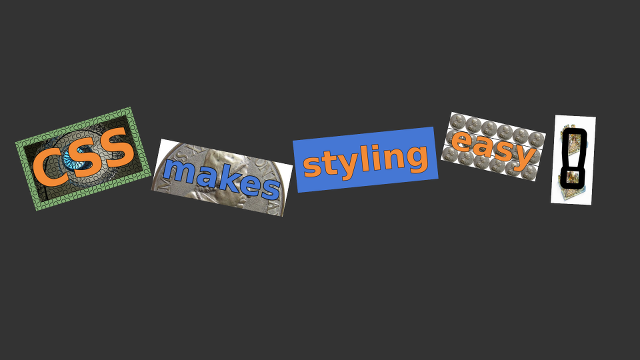
Screenshot of the CSS3Background example
The main program in this example is written in JavaScript. First we add additional stylesheet for the application:
$.app.addStyleFilename("styles.css");
After that we create five MultiWidgets::TextWidgets to the application's main layer and assign IDs to them:
for(var i = 1; i <= 5; ++i) {
var text = new MultiWidgets.TextWidget();
text.setCSSId("w"+i);
$.app.mainLayer().addChild(text);
}
The positions, rotations, font configurations and backgrounds of the widgets are defined in the styles.css. First we define general properties of TextWidget. We define two separate backgrounds clipped into different regions of box. We also resize the widgets to be exactly the size of the displayed text:
background-color: #82ae74;
background-image: "Examples/200px-Truchet_tiling.png", "Examples/TulipStair_QueensHouse_Greenwich25.jpg";
background-clip: padding-box, content-box;
background-size: auto, cover;
background-position: 0 0, top 40% left;
padding: 20px;
resize-to-content: true;
When the object is grabbed we want to make it transparent. For this we use Cornerstone built-in pseudo-state active. Custom pseudo-states are supported with functions Stylish::Styleable::setPseudoClass and Stylish::Styleable::pseudoClass.
TextWidget:active {
opacity: 30%;
}
Some of the general properties of widgets are overriden with the id selectors. Also the texts of the widgets are specified here.
#w2 {
background-image: "Examples/ClemensXI20.jpg";
background-size: cover;
background-position: top 25%;
text: "makes";
Background image can be removed by using specifier none.
#w3 {
background-image: none;
background-color: #4577d4;
text: "styling";
Also the repeating pattern of background images can be overriden.
#w4 {
background-image: "Examples/ClemensXI20.jpg";
background-repeat: space round;
background-size: 45px;
background-color: transparent;
The full source code is shown below:
styles.css :
TextWidget {
background-color: #82ae74;
background-image: "Examples/200px-Truchet_tiling.png", "Examples/TulipStair_QueensHouse_Greenwich25.jpg";
background-clip: padding-box, content-box;
background-size: auto, cover;
background-position: 0 0, top 40% left;
padding: 20px;
resize-to-content: true;
stroke-width: 2px;
stroke: black;
font-family: sans-serif;
font-weight: bold;
font-size: 100px;
wrap-mode: none;
}
TextWidget:active {
opacity: 30%;
}
#w1 {
text: "CSS";
color: #f38b36;
location: 70px 440px;
rotation: -0.3;
font-size: 150px;
}
#w2 {
background-image: "Examples/ClemensXI20.jpg";
background-size: cover;
background-position: top 25%;
text: "makes";
color: #4577d4;
location: 500px 440px;
rotation: 0.2;
stroke-width: 1mm;
}
#w3 {
background-image: none;
background-color: #4577d4;
text: "styling";
color: #f38b36;
location: 900px 440px;
rotation: -0.1;
}
#w4 {
background-image: "Examples/ClemensXI20.jpg";
background-repeat: space round;
background-size: 45px;
background-color: transparent;
origin: 0.5 0.5;
padding: 15px;
text: "easy";
color: #f38b36;
location: 1480px 440px;
rotation: 13deg;
}
#w5 {
background-image: "Examples/Bismuth_crystal_macro30.jpg";
background-size: 100% 50%;
background-repeat: repeat-y;
text: "!";
color: transparent;
origin: 0.5 0.5;
padding: 15px;
location: 1720px 480px;
rotation: 3deg;
font-size: 200px;
stroke-width: 5mm;
}
CSS3Background.js :
$.app.addStyleFilename("styles.css");
for(var i = 1; i <= 5; ++i) {
var text = new MultiWidgets.TextWidget();
text.setCSSId("w"+i);
$.app.mainLayer().addChild(text);
}

