This example demonstrates how to use animators to create animations.
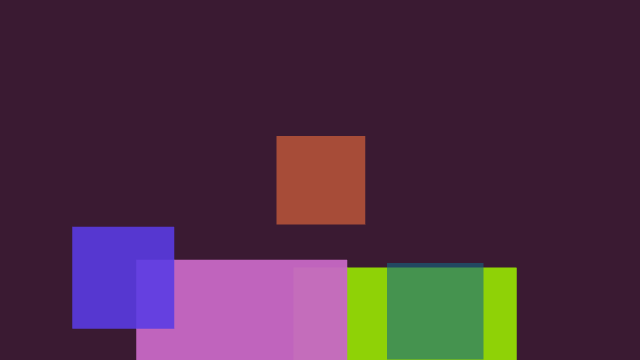
Screenshot of the AnimatorExample example
For this example, we create a custom widget, called AnimatorWidget, by inheriting from MultiWidgets::Widget. In our custom widget, we define a function createAnimations() that creates random animations to all child widgets. We also override the MultiWidgets::Widget::singleTap function, and just call createAnimations() when the widget receives a single-tap event:
The actual animator objects are created in the createAnimations function. We begin by iterating over all children of the widget:
for(ChildIterator it = childBegin(); it != childEnd(); ++it) {
We begin by removing all Operators that we might created earlier from each child widget. As animators are operators themselves, this basically removes all existing animators of given type from the child widgets:
Creating the animators is simple. We just create a specific type of an animator and tell it to animate some attribute. For example, to animate the location attribute of a child widget, we do the following:
auto a1 =
std::make_shared<MultiWidgets::AnimatorVector2f>("location");
a1->addKey(0.0f, w->location());
m_random.randRange(50, height() - 50)));
w->addOperator(a1);
In the createAnimations function we also add animators for scale and background-color for each child widget. Finally, we also remove all operators from the AnimatorWidget itself and animate its background-color:
removeOperatorType<MultiWidgets::AnimatorVector4f>();
auto acolor =
std::make_shared<MultiWidgets::AnimatorVector4f>("background-color");
acolor->addKey(0, backgroundColor());
acolor->addKey(m_random.randMinMax(0.1f, 5.0f),
m_random.rand0X(0.3f),
m_random.rand0X(0.3f),
1.0f));
addOperator(acolor);
In the main function of the example, we just create an instance of the AnimatorWidget. We adjust its input flags to only accept single-taps and pass the input it receives to its children. Then we create five child widgets for it and execute the application. The source code for the example is listed below:
AnimatorWidget.cpp:
#include "AnimatorWidget.hpp"
#include <MultiWidgets/Animators.hpp>
namespace Examples
{
AnimatorWidget::AnimatorWidget()
{}
AnimatorWidget::~AnimatorWidget() {}
void AnimatorWidget::createAnimations()
{
for(ChildIterator it = childBegin(); it != childEnd(); ++it) {
float t = m_random.randMinMax(0.1f, 1.0f);
auto a1 =
std::make_shared<MultiWidgets::AnimatorVector2f>("location");
a1->addKey(0.0f, w->location());
m_random.randRange(50, height() - 50)));
w->addOperator(a1);
auto a2 = std::make_shared<MultiWidgets::AnimatorScale>();
a2->addKey(0.0, w->scale());
a2->addKey(t, m_random.randMinMax(0.2f, 2.4f));
w->addOperator(a2);
auto a3 =
std::make_shared<MultiWidgets::AnimatorVector4f>("background-color");
a3->addKey(0.0, w->backgroundColor());
m_random.rand01(),
m_random.rand01(),
m_random.randMinMax(0.5, 1.0)));
w->addOperator(a3);
}
removeOperatorType<MultiWidgets::AnimatorVector4f>();
auto acolor =
std::make_shared<MultiWidgets::AnimatorVector4f>("background-color");
acolor->addKey(0, backgroundColor());
acolor->addKey(m_random.randMinMax(0.1f, 5.0f),
m_random.rand0X(0.3f),
m_random.rand0X(0.3f),
1.0f));
addOperator(acolor);
}
{
createAnimations();
}
}
AnimatorWidget.hpp:
#ifndef MULTIANIMATE_ANIMATOR_WIDGET_HPP
#define MULTIANIMATE_ANIMATOR_WIDGET_HPP
#include <MultiWidgets/Widget.hpp>
#include <Nimble/Random.hpp>
namespace Examples
{
{
public:
AnimatorWidget();
virtual ~AnimatorWidget();
void createAnimations();
protected:
private:
};
}
#endif
AnimatorExample.cpp:
#include "AnimatorWidget.hpp"
#include <MultiWidgets/Application.hpp>
#include <Nimble/Random.hpp>
int main(int argc, char ** argv)
{
if(!app.
init(argc, argv))
return 1;
auto mainwidget = MultiWidgets::create<Examples::AnimatorWidget>();
mainwidget->setSize(app.
mainLayer()->size());
for(int i = 0; i < 5; i++) {
auto w = MultiWidgets::create<MultiWidgets::Widget>();
mainwidget->addChild(w);
}
mainwidget->createAnimations();
}

